
Watchers
A watcher is the resource that turns raw on-chain logs into verifiable events inside a channel. Each watcher is bound to:
- One channel: the scope into which the verifiable events are emitted.
- One chain: identified by a CCIP chain selector (see Supported Networks).
- One contract address: the contract being observed.
- One or more event signatures: the specific logs you care about.
When a matching log is observed and reaches the configured confidence level, the underlying CRE workflow signs a verifiable record with the DON's Off-Chain Reporting (OCR) keys and posts it back to CRE Connect, where it becomes available through the SDK as a watcher.event event.
Two ways to create a watcher
CRE Connect supports two creation paths. You pick the one that best fits your use case.
Service-backed watcher
A service-backed watcher uses a pre-packaged CRE Connect extension that already knows how to monitor a class of contracts. You name the service (for example, dta.v2), point at a contract address, and pick which of the service's published events you want to receive. The extension ships:
- A protocol-aware monitoring pipeline (provisioned for you by CRE Connect).
- The ABIs of every contract in scope.
- Decoded event types so you do not need to write ABI-decoding glue (see Decode Event Data).
When a CRE Connect extension exists for your protocol, this path lets you reference the service by name (Service: "dta.v2") instead of supplying the contract ABI yourself. See Create a Watcher with a Predefined Service.
watcher, err := client.Watchers.CreateWithService(
    ctx,
    channelID,
    watchers.CreateWithServiceInput{
        Name:          "DTA fund alpha",
        ChainSelector: "16015286601757825753", // Ethereum Sepolia
        Address:       "0xFundAddress...",
        Service:       "dta.v2",
        Events:        []string{"SubscriptionRequested", "RedemptionRequested"},
    },
)
ABI-backed watcher (custom)
An ABI-backed watcher accepts a raw ABI and one or more event names. CRE Connect generates the watching pipeline on the fly. Use this path for any contract that is not covered by a predefined service. See Create a Watcher with a Custom ABI.
watcher, err := client.Watchers.CreateWithABI(
    ctx,
    channelID,
    watchers.CreateWithABIInput{
        Name:          "USDC transfers on Sepolia",
        ChainSelector: "16015286601757825753",
        Address:       "0x1c7D4B196Cb0C7B01d743Fbc6116a902379C7238",
        ABI:           usdcABI, // []watchers.EventABIInput
        Events:        []string{"Transfer"},
    },
)
The SDK validates that every requested event name exists in the ABI and that every supplied entry is of type event before the request is sent.
Lifecycle
Watchers are stateful resources. The WatcherStatus enum has these values:
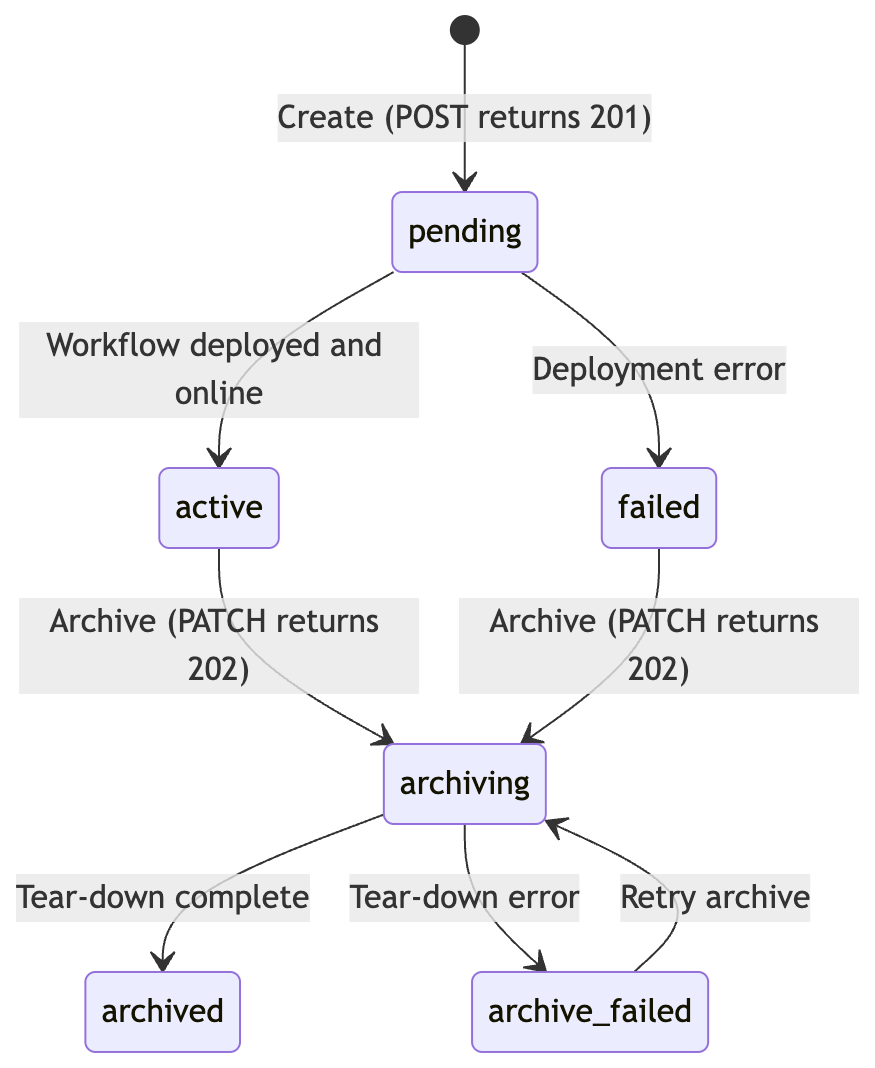
Status | Meaning | What you can do |
|---|---|---|
pending | The watcher request was accepted; CRE is provisioning the workflow. | Use WaitForActive(ctx, channelID, watcherID, timeout) to block until ready. |
active | The watcher is observing chain state and emitting events. | Poll events with client.Events.Poll(...). |
archiving | An archive request is in progress (operation is async: 202 Accepted). | Use WaitForArchived(ctx, channelID, watcherID, timeout). |
archived | The watcher is fully torn down. | The watcher is read-only; its historical events remain accessible. |
failed | An unrecoverable error occurred during create or archive. | Inspect the latest watcher.status event for the error reason; archive and recreate. |
A separate WatcherEventStatus enum is carried inside watcher.status events. It includes everything in WatcherStatus plus an explicit archive_failed value, so subscribers can distinguish a failed deployment from a failed teardown.
DON family (don_family)
Every Watcher and WatcherSummary returned by the API carries a don_family field (e.g. "zone-a"). It identifies the DON whose nodes provisioned the watcher's workflow and signed its events. You do not set don_family on creation: the backend assigns it based on your channel's deployment. Surface it in dashboards and use it to verify event signatures: match the signers reported in watcher.event payloads against the keys announced by that DON family. See Verify Signatures.
w, _ := client.Watchers.Get(ctx, channelID, watcherID)
fmt.Println("watcher", w.WatcherId, "is signed by DON family", w.DonFamily)
Defaults and limits (SDK)
| Setting | Default | Configurable via |
|---|---|---|
| Watcher name minimum length | 4 runes (after trimming whitespace) | n/a: enforced client-side |
| Polling interval (events) | 2 seconds | crec.WithWatcherPolling(...) |
| Eventual-consistency window | 2 seconds | crec.WithWatcherPolling(...) |
| Confidence level | Per-network default returned by ListNetworks | Currently set by the platform; see Confidence Levels |
Updating a watcher
Updates after creation are intentionally narrow: only the watcher name can be changed via Update. To change the chain, address, ABI, or event list, archive the watcher and create a new one.
Related
- Create a Watcher with a Predefined Service · Create a Watcher with a Custom ABI · Manage Watcher Lifecycle: the implementation guides.
- Verifiable Events: what a watcher emits.
- Confidence Levels: how a watcher decides when an event is "ready".
- Channels: the container a watcher lives in.