
Operations and Transactions
An Operation is the unit of write in CRE Connect. It packages one or more EVM transactions into a single, atomic, EIP-712-signed batch that a Smart Account executes on behalf of your application without your application managing gas, nonces, or relayers. If any transaction in the batch reverts, the entire Operation reverts.
For deferred-signing workflows, see Draft Operations. For the underlying signing mechanism and the on-chain execution model, see EIP-712 Signing and Smart Accounts.
Data model
An Operation is composed of two structs that live in transact/types:
type Transaction struct {
    To    common.Address  `json:"to"`
    Value *big.Int        `json:"value,string"`
    Data  hexutil.Bytes   `json:"data"`
}

type Operation struct {
    ID           *big.Int        `json:"id"`
    Account      common.Address  `json:"account"`
    Deadline     *big.Int        `json:"deadline"`
    Transactions []Transaction   `json:"transactions"`
}
Field | Meaning |
|---|---|
ID | The wallet operation ID. A nonce-like value chosen by the client. When you call ExecuteTransactions, the SDK generates a random 128-bit ID; when you construct an Operation manually, you choose the ID yourself. |
Account | The Smart Account address (the wallet) that will execute the Operation. This must equal the verifyingContract of the EIP-712 domain. |
Deadline | A Unix timestamp after which the Operation must not be executed. The DON ignores Operations whose deadline has passed. |
Transactions | An ordered list of Transaction structs. They execute in order, atomically. |
Each Transaction is just (to, value, data), exactly what you would pass to eth_sendTransaction, except the sender is the Smart Account, not the EOA that signed the Operation.
End-to-end flow
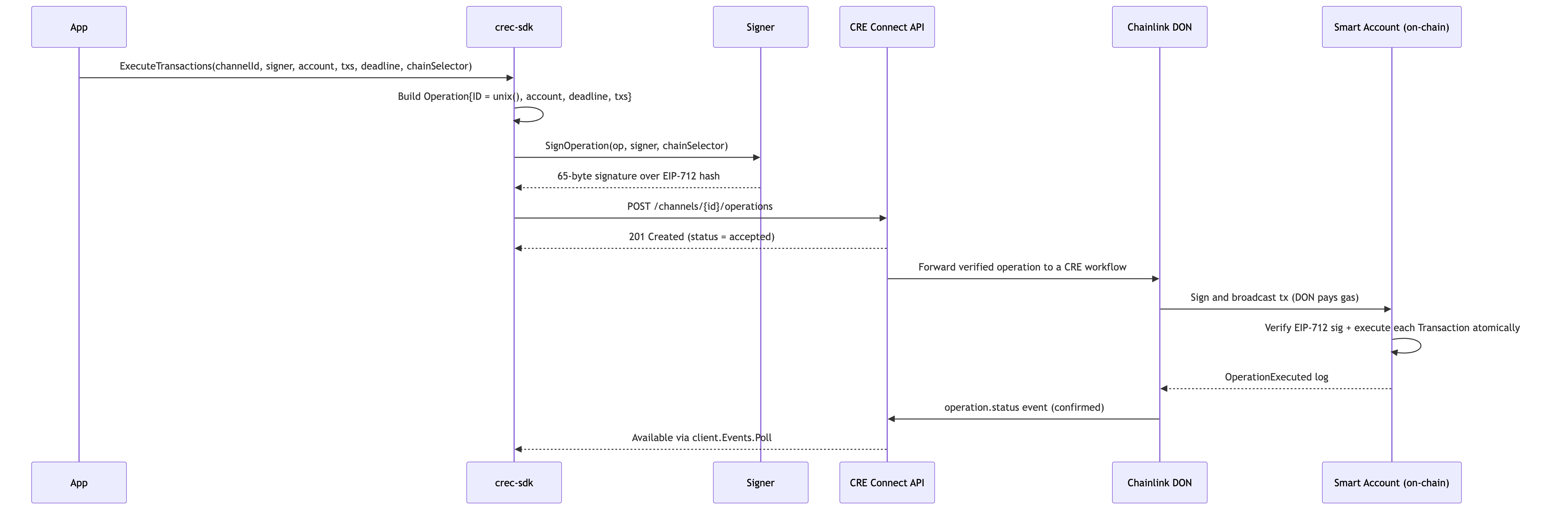
Signing
The SDK signs the Operation client-side using EIP-712 typed data. The domain is fixed across CRE Connect:
| Field | Value |
|---|---|
name | CLLSmartAccount |
version | 1 |
chainId | Derived from the chainSelector argument via GetChainIDFromSelector. |
verifyingContract | The Smart Account address (Operation.Account). |
The signing key can be any implementation of the signer.Signer interface: local ECDSA, AWS KMS, HashiCorp Vault, Fireblocks, Privy, or your own custom adapter.
Submission helpers
The SDK exposes two entry points on client.Transact:
ExecuteTransactions
The high-level helper. Builds the Operation, signs it, and submits it in one call.
op, err := client.Transact.ExecuteTransactions(
    ctx,
    channelID,                    // uuid.UUID
    operationSigner,              // signer.Signer
    smartAccountAddress,          // common.Address
    []types.Transaction{tx1, tx2},
    big.NewInt(time.Now().Add(15*time.Minute).Unix()), // deadline
    chainSelector,                // string
)
ExecuteTransactions generates a random 128-bit wallet operation ID, so two calls in the same second never collide. If you construct the Operation manually instead, you own the ID: make it unique per Smart Account, because the Smart Account rejects re-used IDs.
ExecuteOperation
Lower-level: takes a fully-formed *types.Operation (so you can override ID or assemble a complex multi-transaction batch yourself), signs it, and submits it. Use this when you need precise nonce control or want to construct the Operation through extension builders such as the DTA Prepare*Operation helpers.
op, err := client.Transact.ExecuteOperation(ctx, channelID, signer, builtOperation, chainSelector)
Draft operations
Operations can also be created without a signature. CRE Connect stores these as draft operations in pending_signature state until your application finalizes them with a digest and signature, cancels them, or lets their deadline expire.
Drafts are useful when the signer is not available synchronously: MPC policy approval, human review, KMS approval workflows, or UIs that show decoded transaction previews before the user signs. See Draft Operations for the model and Draft Operations: Create, Finalize, Cancel for the SDK flow.
Lifecycle
The submitted Operation is observable through the channel's event stream. A signed operation starts at accepted; a draft starts at pending_signature and must be finalized before relay. From there, CRE Connect reports relay progress, progressive on-chain confirmation, cancellation, expiration, or failure through operation.status events.
For the complete state diagram and status table, see Lifecycles. For the confirmation model, see Multi-Event Finality. For polling and event verification patterns, see Submit and Track Operations.
Draft lifecycle events (pending_signature, cancelled, expired) are operational notifications without DON proofs. Confirmation events (confirmed_latest, confirmed_safe, confirmed) carry DON proofs and can be verified with client.Events.VerifyOperationStatus.
Atomicity
All transactions in a single Operation execute atomically: the Smart Account either executes every transaction successfully, or it reverts the entire batch. This guarantee makes Operations useful for multi-step on-chain flows, for example, "approve token + call DTA contract + emit auxiliary log", that would otherwise require careful retry handling on partial failure.
If you need all-or-some semantics (e.g. several independent token transfers that should succeed independently), submit them as separate Operations, one Operation per transaction. See Batch Transactions for guidance on choosing.
Related
- EIP-712 Signing: what gets signed and why.
- Smart Accounts: the on-chain executor.
- Account Abstraction & Gas Sponsorship: the gas-less execution model.
- Build and Sign Operations · Submit and Track Operations · Batch Transactions: the implementation guides.